Public Verifiable Certificates
Public Verifiable Certificates in this context are the certificates that are issues and verified by some organization. For example, there is an online course platform which issues certificates for the completion of certain programs or courses. Now these certificates issued to the participants (if verifiable) should have some authenticity check. This authenticity can be provided by some mechanism developed by the organization itself that the issues certificate is genuine. These certificates are called Public Verifiable Certificates.
What is Sunbird?
Sunbird is an open source, configurable, extendable, modular learning management platform made for scale and designed to support multiple teaching and learning solutions supporting multiple languages and available for online and offline use.
Sunbird was developed by EkStep Foundation, a not-for-profit foundation registered in India and co-founded by Nandan Nilekani, Rohini Nilekani, and Shankar Maruwada, and is licensed under MIT license.
Sunbird makes it possible to leverage technology for education by providing building blocks for the creation of learning solutions. It contains well-architected common building blocks that can be orchestrated to create multiple solutions without a need to build from scratch.
The Sunbird ecosystem includes various specialized building blocks like:
Sunbird RC (Registry and Credentials) – for electronic registries and verifiable credentials
DIVOC – for digital vaccination management and credentialing
Sunbird Anuvaad – for AI-based document translation in Indic languages
So Sunbird is essentially a broader ecosystem of modular educational technology tools, with SunbirdRC being one specialized component focused on registries and credentials.
Sunbird RC
Now, out of these technologies, SunbirdRC is a framework for building electronic registries and verifiable credentials, including attestation and verification flows. Think of it as a toolkit for creating digital databases that not only store information but also issue verifiable digital credentials.
It solves the problem where Digital Systems need to maintain master data and actor data (about people, entities, or things) in a structured and validated way for identification and validation purposes.
For example:
A property tax system needs data about properties, land boundaries, tax codes, taxpayers, and inspection officers, An education system needs verified records of teachers, students, and their qualifications, A healthcare system needs registries of doctors, their licenses, and credentials.
Components Of Sunbird RC
Electronic Registries – Structured databases with Open APIs for creating, reading, updating, and managing various types of data.
Verifiable Credentials – Digital credentials that can be cryptographically signed and verified, similar to how you might have a physical certificate but in digital form.
Attestation Workflows – Processes for validating and approving data before it gets added to the registry or before credentials are issued.
How It Works?
SunbirdRC is a low-code framework that lets you build electronic registries and issue verifiable credentials through simple JSON configuration files. The system automatically generates CRUD APIs without writing any code.
The Flow in Simple Terms:
Define Schema (JSON file) → Describe what data you want to store
Deploy → SunbirdRC automatically creates APIs
Create Entities → Use POST API to add data
Attestation (optional) → Get data verified by authorized users
Issue Credentials → Generate verifiable certificates
Verify → Anyone can cryptographically verify the credentials
The beauty of SunbirdRC is that you don’t write any backend code – you just configure JSON schemas and everything (APIs, database tables, authentication, workflows) is auto-generated!
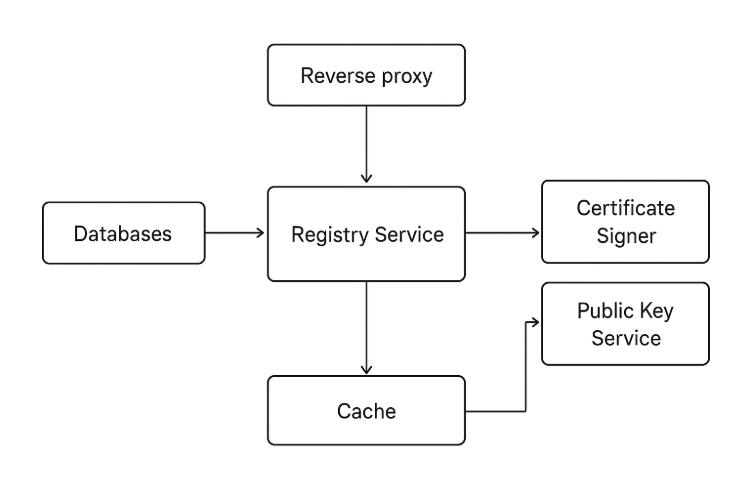
Step 1: Setup SunbirdRC
Setting up using Registry CLI
# Install registry CLI
npm install -g @sunbird-rc/cli

# Create a new registry project
sunbird-rc init my-registry
cd my-registry

# Start services
docker-compose up -d
Step 2: Define Your Schema
Define schemas for what data you want to store. Schemas define the entities (data models) in your registry. They use JSON Schema format.
Create a file Teacher.json in the schemas/ folder:
{
  "$schema": "http://json-schema.org/draft-07/schema",
  "type": "object",
  "properties": {
    "Teacher": {
      "$ref": "#/definitions/Teacher"
    }
  },
  "required": ["Teacher"],
  "title": "Teacher",
  "definitions": {
    "Teacher": {
      "$id": "#/properties/Teacher",
      "type": "object",
      "required": ["name", "phoneNumber", "email", "subject", "school"],
      "uniqueIndexFields": ["phoneNumber"],
      "properties": {
        "name": {
          "type": "string"
        },
        "phoneNumber": {
          "type": "string"
        },
        "email": {
          "type": "string",
          "format": "email"
        },
        "subject": {
          "type": "string"
        },
        "school": {
          "type": "string"
        },
        "experience": {
          "type": "number"
        },
        "passwordToken": {
          "type": "string"
        }
      }
    }
  },
  "_osConfig": {
    "privateFields": ["$.phoneNumber"],
    "internalFields": ["$.passwordToken"],
    "indexFields": ["name", "school"],
    "uniqueIndexFields": ["phoneNumber"],
    "systemFields": ["_osCreatedAt", "_osUpdatedAt"],
    "ownershipAttributes": [
      {
        "email": "/email",
        "mobile": "/phoneNumber",
        "userId": "/phoneNumber",
        "password": "/passwordToken"
      }
    ],
    "roles": ["teacher-admin"],
    "inviteRoles": ["teacher-admin"]
  }
}
Schema Configuration Explained
Field Types:
string, number, boolean, array, object
format for validation (email, date-time, uri, etc.)
Access Control (_osConfig):
privateFields: Accessible by owner + consent from 3rd parties
internalFields: System-only fields, never exposed
indexFields: Fields indexed for faster queries
uniqueIndexFields: Ensures uniqueness across entities
Ownership Attributes:
Maps fields to user identity (for login/consent)
email, mobile, userId, password mappings
Roles:
roles: Who can perform CRUD operations
inviteRoles: Who can invite new entities
Step 3: Add Attestation Workflow
Set up workflows for who can verify/approve that data. Attestation allows authorized users to verify/approve data before it’s added to the registry.
Add to _osConfig in schema:
"attestationPolicies": [
  {
    "name": "teacherSchoolAttest",
    "additionalInput": {
      "employeeId": {
        "type": "string"
      }
    },
    "attestorPlugin": "did:internal:ClaimPluginActor?entity=School",
    "attestorEntity": "School",
    "conditions": "(ATTESTOR#$school#.contains(REQUESTER#$.school#))",
    "type": "MANUAL",
    "attestationProperties": {
      "name": "$.name",
      "school": "$.school",
      "subject": "$.subject"
    }
  }
]
Attestation Types:
MANUAL: Requires human approval
AUTOMATED: Auto-approved based on conditions
Step 4: Configure Verifiable Credentials
Issue digital credentials based on verified registry data.
Add certificate template to issue verifiable credentials:
"certificateTemplates": {
  "teacherCertificate": "https://example.com/templates/teacher-cert.html"
}
Create HTML template with Handlebars syntax:
<!DOCTYPE html>
<html>
<head>
  <title>Teacher Certificate</title>
</head>
<body>
  <h1>Certificate of Teaching</h1>
  <p>This certifies that <strong>{{name}}</strong></p>
  <p>teaches {{subject}} at {{school}}</p>
  <p>Phone: {{phoneNumber}}</p>
  <div>{{qrCode}}</div>
</body>
</html>
Step 5: Deploy Schema
Place schema file in the schemas folder and restart:
# If using docker-compose
docker-compose up --force-recreate -d

# Or restart registry service only
docker-compose restart registry
The registry will:
Load the schema
Create database tables
Generate CRUD APIs automatically
Set up attestation workflows
How To Consume The Application?
1. Create an Entity (Invite)
curl -X POST http://localhost:8081/api/v1/Teacher/invite \
  -H "Content-Type: application/json" \
  -d '{
    "name": "Pranav Agate",
    "phoneNumber": "1234567890",
    "email": "[email protected]",
    "subject": "Math",
    "school": "UP Public School",
    "experience": 5
  }'
Response:
{
  "id": "open-saber.registry.invite",
  "ver": "1.0",
  "ets": 1634567890,
  "params": {
    "resmsgid": "12345",
    "msgid": "67890",
    "status": "SUCCESSFUL"
  },
  "result": {
    "Teacher": {
      "osid": "1-abc123-456def-789ghi"
    }
  }
}
2. Authenticate as Entity
curl -X POST http://localhost:8080/auth/realms/sunbird-rc/protocol/openid-connect/token \
  -H "Content-Type: application/x-www-form-urlencoded" \
  -d "client_id=registry-frontend" \
  -d "username=1234567890" \
  -d "password=test" \
  -d "grant_type=password"
Response:
{
  "access_token": "eyJhbGciOiJSUzI1NiIsInR5cCIgOi...",
  "expires_in": 300,
  "refresh_token": "eyJhbGciOiJIUzI1NiIsInR5cCI...",
  "token_type": "Bearer"
}
3. Read an Entity
curl -X GET http://localhost:8081/api/v1/Teacher/1-abc123-456def-789ghi \
  -H "Authorization: Bearer {access_token}"
Response:
{
  "name": "Pranav Agate",
  "phoneNumber": "1234567890",
  "email": "[email protected]",
  "subject": "Math",
  "school": "UP Public School",
  "experience": 5,
  "osid": "1-abc123-456def-789ghi"
}
4. Update an Entity
curl -X PUT http://localhost:8081/api/v1/Teacher/1-abc123-456def-789ghi \
  -H "Authorization: Bearer {access_token}" \
  -H "Content-Type: application/json" \
  -d '{
    "experience": 6
  }'
5. Search Entities
curl -X POST http://localhost:8081/api/v1/Teacher/search \
  -H "Content-Type: application/json" \
  -d '{
    "filters": {
      "school": {
        "eq": "UP Public School"
      }
    }
  }'
6. Raise a Claim (Request Attestation)
curl -X POST http://localhost:8081/api/v1/Teacher/1-abc123-456def-789ghi/attest/teacherSchoolAttest \
  -H "Authorization: Bearer {access_token}" \
  -H "Content-Type: application/json" \
  -d '{
    "employeeId": "EMP-12345",
    "name": "Pranav Agate",
    "school": "UP Public School",
    "subject": "Math"
  }'
7. Attest a Claim (Approve/Reject)
# Approve
curl -X POST http://localhost:8081/api/v1/Teacher/1-abc123-456def-789ghi/attestations/{claim-id}/approve \
  -H "Authorization: Bearer {attestor_token}" \
  -H "Content-Type: application/json"

# Reject
curl -X POST http://localhost:8081/api/v1/Teacher/1-abc123-456def-789ghi/attestations/{claim-id}/reject \
  -H "Authorization: Bearer {attestor_token}" \
  -H "Content-Type: application/json" \
  -d '{
    "reason": "Invalid employee ID"
  }'
8. Generate Certificate
curl -X GET http://localhost:8081/api/v1/Teacher/1-abc123-456def-789ghi/credentials/teacherCertificate \
  -H "Authorization: Bearer {access_token}"
Returns signed PDF or HTML certificate with QR code.
9. Verify Certificate
curl -X POST http://localhost:8081/api/v1/credentials/verify \
  -H "Content-Type: application/json" \
  -d '{
    "credential": "{signed_credential_data}"
  }'
Complete Workflow Example
Use Case: Teacher Onboarding with School Verification
- Teacher Self-Registration
- Teacher fills online form
- POST
/api/v1/Teacher/invite - Account created but not verified
- School Admin Reviews
- Teacher raises claim for attestation
- POST
/api/v1/Teacher/{id}/attest/teacherSchoolAttest - School admin receives notification
- School Admin Approves
- School admin logs in
- Reviews teacher details
- POST
/api/v1/Teacher/{id}/attestations/{claim-id}/approve
- Certificate Issued
- System automatically generates certificate
- GET
/api/v1/Teacher/{id}/credentials/teacherCertificate - Teacher receives digital credential
- Third-Party Verification
- Another school wants to verify credentials
- POST
/api/v1/credentials/verifywith certificate - Instant cryptographic verification